
DTF Design Files 101: How to Send Print-Ready Artwork
Share
DTF printing can deliver incredibly vibrant, detailed transfers but the final result is only as good as the file you send.
Most issues people blame on the printer (blurry edges, pixelation, unexpected boxes behind artwork, muddy colors) actually start with the design file. If you want DTF transfers that press clean and look professional, here’s the simple checklist.
The #1 Rule: Build the File at Final Print Size
A common mistake is sending a small image and expecting it to scale up.
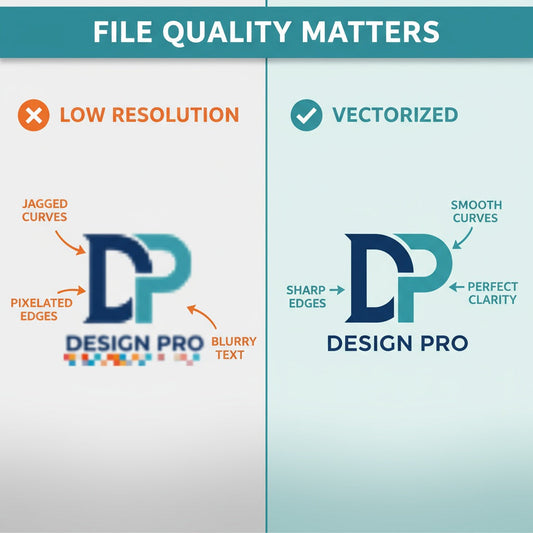
DTF will print what you provide, so if the artwork is low resolution at the size you want, it will look soft or pixelated.
Best practice: create/export your design at the exact size you want it printed.
Recommended File Types (Best to Good)
-
Vector files: AI, SVG, PDF (best for logos and text)
-
Raster files: PNG (best when you need transparency)
Avoid sending screenshots or images pulled from social media, those are usually compressed and low resolution.
Resolution Guidelines (For Raster Artwork)
If you’re sending a PNG (or any raster image), aim for:
-
300 DPI at final print size
Example: if you want an 11" wide front print, the file should be high resolution at 11" wide not created small and stretched.
Transparent Backgrounds: Prevent the “White Box” Problem
If your design is meant to be cut around the artwork, send it with a transparent background.
-
Use PNG with transparency
-
Don’t place the design on a white rectangle unless you want that printed
Tell Us the Print Placement + Size
To avoid guessing (and to keep results consistent), include the intended placement and size, like:
-
Left chest: 3.5" wide
-
Full front: 11" wide
-
Full back: 12" wide
If you’re ordering multiple placements, label them clearly.
Clean Edges + Readable Details
Small text and thin lines can work great with DTF but only if the artwork is clean.
-
Avoid fuzzy outlines
-
Avoid heavy JPG compression
-
Use vector text/logos when possible
Gang Sheets: How to Set Up Files for Easy Cutting
If you’re ordering a gang sheet, a little prep goes a long way:
-
Leave space between designs for cutting
-
Keep designs aligned and organized
-
Label versions if you have multiple sizes
Quick “Print-Ready” Checklist
Before you send your file, ask:
-
Is this the correct final size?
-
Is it 300 DPI (if raster)?
-
Is the background transparent (if needed)?
-
Is the artwork clean and not a screenshot?
-
Did I include placement + size instructions?
Bottom Line
DTF printing is incredibly forgiving compared to some methods but it can’t create detail that isn’t in the file.
If you’re unsure whether your artwork is print-ready, send it to us at tshrit@3dottees.com.
A quick check upfront can save time, money, and reprints so your transfers come out sharp, vibrant, and ready to press.
3 Dot TeesDTF Transfers + Custom Apparel www.3dottees.com